
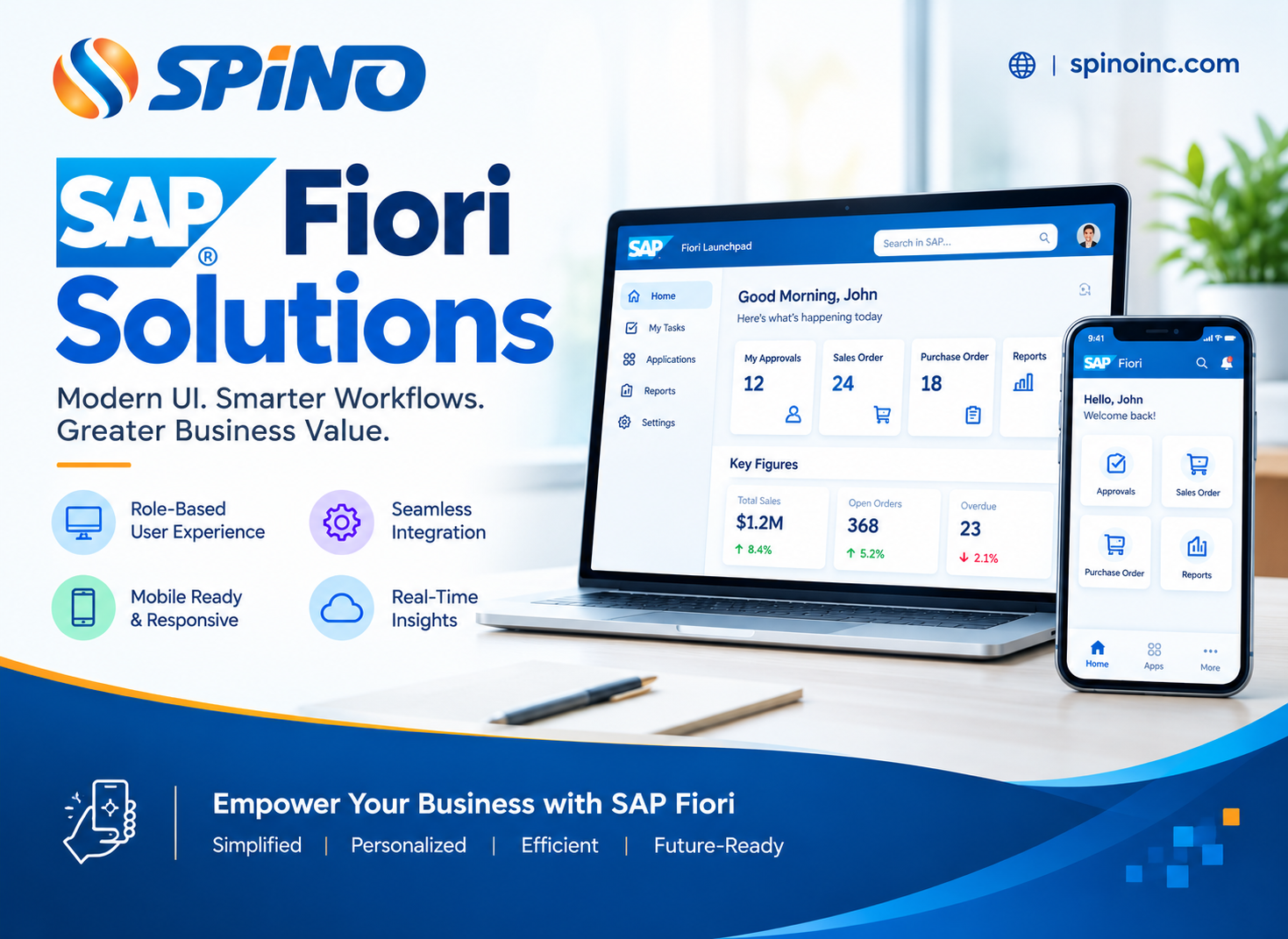
1.1 Executive Summary & Market Imperative
In modern enterprise computing environments, employee productivity, data integrity, and operational speed are directly dictated by the quality of the user interface (UI) and user experience (UX). Legacy enterprise resource planning (ERP) interfaces—most notably classical SAP GUI dynpros—were built around technical backend data models rather than human workflows. They required users to memorize complex Transaction Codes (T-Codes), navigate nested sub-menus, execute multi-screen keystrokes for simple approvals, and remain tethered to desktop hardware workstations. This technical friction incurs massive organizational costs: prolonged employee onboarding times, elevated human error rates during high-volume transactional processing, low system adoption, and an inability to empower deskless field personnel. Spino Inc. delivers end-to-end, corporate-grade SAP Fiori UX Design & Custom App Development services engineered to transform heavy, multi-step SAP ERP transactions into role-based, responsive, and intuitive digital experiences. By implementing SAP’s latest Horizon Design System and SAP Fiori 3.0 guidelines, Spino Inc. bridges the gap between deep backend ERP processing power and modern consumer-grade mobile usability. Whether your enterprise is migrating from legacy SAP ECC 6.0 to SAP S/4HANA, extending operational supply chain workflows, or seeking clean-core mobile enablement on SAP Business Technology Platform (BTP), our specialized UI/UX architects and SAPUI5 engineers deliver human-centered design frameworks that accelerate execution, improve compliance, and maximize total ROI on your SAP investment.1.2 Strategic Value Drivers: The ROI of Enterprise SAP Fiori Modernization
Modernizing your enterprise SAP user layer with SAP Fiori is not a visual polish or cosmetic exercise; it is a fundamental operational upgrade that yields quantifiable financial and operational returns across business functions:1. Role-Based Contextual Efficiency
Traditional SAP GUI presents every user with access to vast, uncurated menu structures. In contrast, the SAP Fiori Launchpad acts as an intelligent, role-tailored digital workspace. Users see only the specific tiles, real-time KPI metrics, task queues, and actionable alerts relevant to their exact organizational role (e.g., Accounts Payable Clerk, Warehouse Manager, Maintenance Engineer, or Chief Financial Officer).2. Mobile Workforce Enablement & Universal Access
Spino Inc. designs Fiori apps that run natively across smartphones, tablets, rugged industrial handhelds, and desktop web browsers. By extending SAP access directly to field engineers, logistics crews, and traveling managers, transaction bottlenecks are eliminated, and turnaround times for purchase orders, work tickets, and inventory updates drop from days to seconds.3. Real-Time Insight-to-Action Workflows
Standard ERP systems force users to run batch reports in one transaction, extract data, analyze it in spreadsheets, and then open a separate transaction to execute an operational decision. SAP Fiori analytical applications integrate real-time SAP HANA in-memory analytics directly into transactional views. Executives and operational leads evaluate real-time data visualizations and execute immediate transactional approvals within a single, unified interface.4. Clean-Core ERP Architecture Compliance
By utilizing modern SAPUI5 frameworks, Fiori Elements, and OData V2/V4 APIs hosted on SAP BTP or SAP S/4HANA extension layers, enterprise UI custom logic remains completely decoupled from core ERP ABAP code. This adherence to a “Clean Core” strategy ensures that future SAP S/4HANA release upgrades occur seamlessly without breaking custom user interfaces.1.3 Spino Inc. End-to-End SAP Fiori Service Lifecycle
Spino Inc. provides a full-lifecycle operational methodology for enterprise UI/UX modernization: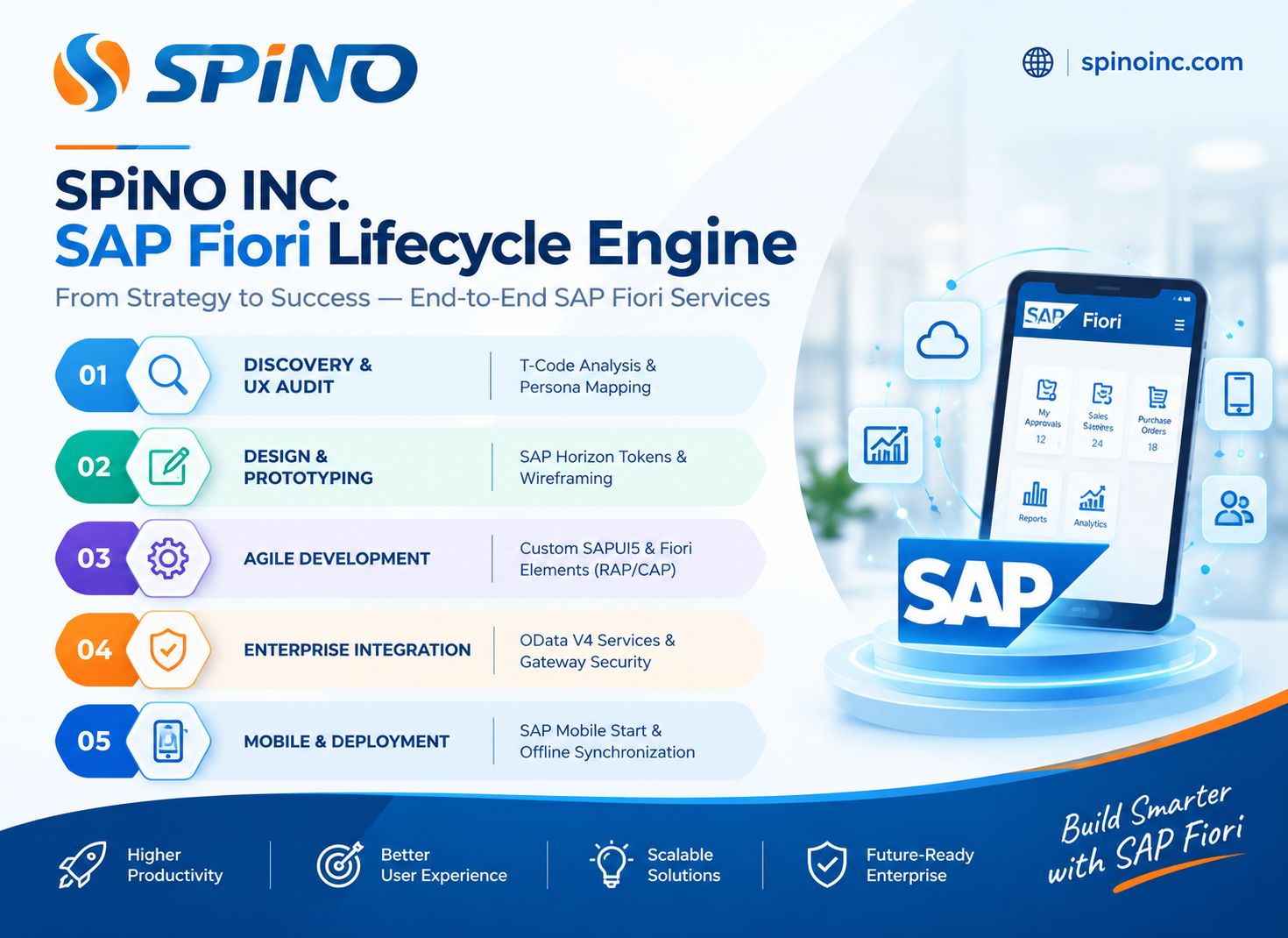
A. UX Strategy, Operational Audit & Persona Mapping
Our human-centered UI/UX architects conduct deep-dive discovery workshops across your business units. We audit high-frequency, friction-heavy T-Codes (e.g., ME21N, VA01, IW31), analyze user error patterns, map out distinct organizational personas, and construct a prioritized Fiori modernization roadmap aligned with business KPI goals.B. Custom SAPUI5 Application Development
When standard, out-of-the-box SAP Fiori apps do not support your proprietary, competitive business logic, Spino Inc. designs and develops custom SAPUI5 applications from the ground up. Built using HTML5, CSS3, JavaScript, and SAPUI5 libraries, our custom apps deliver enterprise-grade performance, rich data binding, and full cross-browser compatibility while strictly adhering to official SAP design tokens.C. Accelerated UI Delivery via SAP Fiori Elements
To minimize custom code maintenance and accelerate time-to-value, Spino Inc. implements SAP Fiori Elements. By leveraging metadata-driven UI templates—including List Report Pages, Object Pages, Analytical List Pages, Overview Pages, and Worklists—we generate standard-compliant UI frontends automatically from OData service annotations, reducing frontend development effort by up to 60%.D. Screen Simplification with SAP Screen Personas
For organizations that require rapid UI simplification for classical SAP GUI dynpros or Web Dynpro applications without rewriting backend ABAP business logic, Spino Inc. deploys SAP Screen Personas. We consolidate multi-tab screens into clean, single-page views, pre-fill repetitive fields, and automate keystroke sequences via scripts.E. Mobile Workforce Enablement & Offline Synchronization
We empower deskless workers with mobile-first enterprise applications. Utilizing SAP Mobile Services, SAP Mobile Start, and Progressive Web App (PWA) architectures, Spino Inc. builds offline-capable Fiori applications that store data locally during connectivity outages and sync seamlessly with backend SAP systems once connectivity is restored.1.4 Technical Architecture: The SAP Fiori Modern Integration Stack
To deliver high-speed, secure, and upgrade-stable SAP Fiori applications, Spino Inc. enforces a three-tier clean-core architectural model: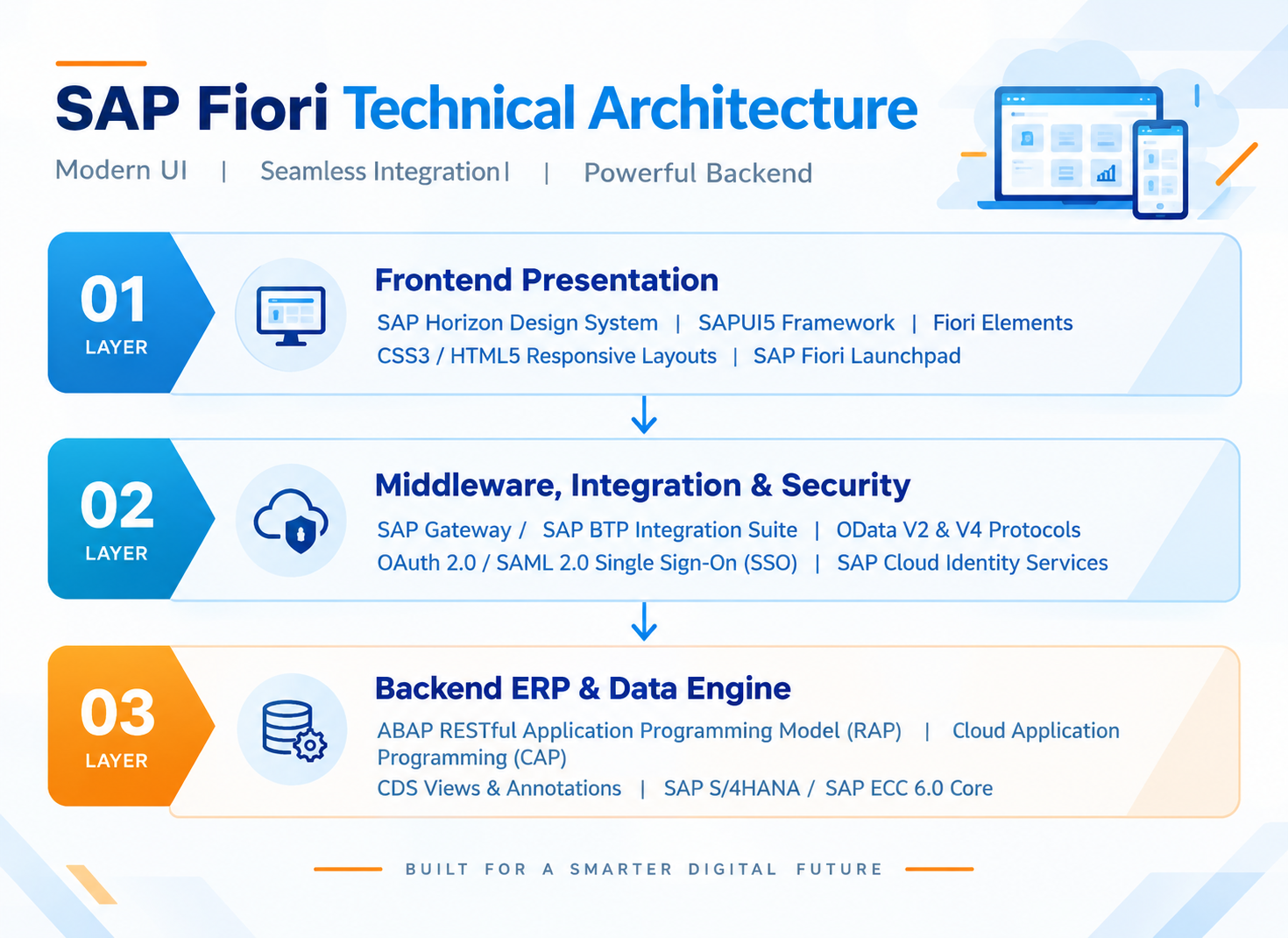
Layer Details:
- Frontend Presentation Layer: Built on the SAP Horizon design language, utilizing light and dark visual themes, responsive flexbox grid layouts, accessibility features (WCAG 2.1 compliance), and localized multi-language translation bundles (
i18n). - Middleware & API Gateway Layer: Utilizes SAP Gateway or SAP BTP Integration Suite to expose secure OData (Open Data Protocol) RESTful services. Enterprise security is enforced via SAML 2.0, OAuth 2.0 token exchange, and SAP Cloud Identity Access Governance.
- Backend Data Layer: Powered by SAP HANA in-memory database engines. Modern extensions leverage Core Data Services (CDS) views and the ABAP RESTful Application Programming Model (RAP) to execute data processing natively inside the database layer for lightning-fast response times.
1.5 Detailed Technical Comparison: Legacy SAP GUI vs. Spino Inc. SAP Fiori UX
| Dimension | Legacy SAP GUI Infrastructure | Spino Inc. SAP Fiori UX Modernization |
|---|---|---|
| User Interface Paradigm | Function-driven; dense dynpro screens with technical fields. | Role-based; simple, contextual tiles and actionable tasks. |
| Navigation Model | Manual T-Codes (e.g., ME21N, VA01) and nested sub-menus. | Role-based SAP Fiori Launchpad with global enterprise search. |
| Device Accessibility | Desktop PC bound; requires SAP GUI client installation. | Universal browser & mobile access (iOS, Android, Tablets, Handhelds). |
| Design Language | Classical grey tabular grids; high visual noise. | Modern SAP Horizon Design System; fluid, accessible visual hierarchy. |
| Data Processing | Batch processing; separate screens for reporting vs. action. | Real-time embedded analytics with direct transactional execution. |
| Customization Impact | Modifies core ABAP screens; high risk during ERP upgrades. | Clean Core architecture; extensions decoupled via BTP and OData APIs. |
| Training Requirements | High; requires weeks of user training and desktop cheat-sheets. | Minimal; intuitive, consumer-grade usability reduces onboarding to hours. |
1.6 Deep-Dive Enterprise Use Cases
Use Case 1: Intelligent Procurement & Approval Workflows
-
Challenge: Purchase order approvals in a multi-billion dollar manufacturing firm required managers to log into SAP GUI via VPN, navigate T-Code
ME28, and manually verify line items, causing 4-day approval delays. -
Spino Inc. Solution: We deployed a responsive SAP Fiori custom app integrated with SAP My Inbox on SAP BTP. Managers receive push notifications on mobile devices, review attached supplier documentation, inspect line-item CDS analytics, and approve orders in a single tap.
-
Business Impact: Purchase order processing time was reduced by 85%, vendor lead times dropped by 3 days, and manager approval compliance reached 99.4%.
Use Case 2: Warehouse Logistics & Barcode Scanning Automation
-
Challenge: Warehouse operators recorded stock movements on paper clipboards before entering data manually into SAP ECC
MIGOat the end of shifts, leading to inventory discrepancies and delayed shipping. -
Spino Inc. Solution: Spino Inc. developed a custom SAPUI5 app optimized for rugged Android barcode scanners. Operators scan bin locations, serial numbers, and material tags directly at the loading dock with real-time OData validation against SAP S/4HANA.
-
Business Impact: Inventory accuracy increased to 99.8%, order picking speeds rose by 40%, and data entry errors were completely eliminated.
1.7 FAQs: SAP Fiori UX Design & Custom App Development
Q1: What is the core structural difference between SAP GUI and SAP Fiori?
Answer: SAP GUI is a client-server desktop interface structured around technical Transaction Codes (T-Codes) and dense backend database fields. SAP Fiori is a web-based, mobile-responsive, role-based UX framework that presents users with intuitive, task-focused applications tailored to their operational responsibilities.
Q2: What is SAPUI5 and how does it relate to SAP Fiori?
Answer: SAP Fiori is the design concept, usability guidelines, and visual language defined by SAP. SAPUI5 is the HTML5-based JavaScript web framework, control library, and runtime environment used by developers to build custom SAP Fiori-compliant web applications.
Q3: What are SAP Fiori Elements and how do they accelerate development?
Answer: SAP Fiori Elements provide predefined, standard-compliant UI page patterns (such as List Report, Object Page, Analytical List Page, and Overview Page). Instead of manually coding JavaScript views, developers add OData annotations in the backend (e.g., via CDS views in ABAP RAP), allowing the Fiori frontend to render automatically. This cuts UI development time by up to 60%.
Q4: Can custom SAP Fiori applications operate offline for field personnel?
Answer: Yes. Spino Inc. builds offline-capable mobile solutions using SAP Mobile Services, Progressive Web App (PWA) caching, and local IndexedDB database storage. Field technicians can view work orders, perform inspections, and log material usage offline; data synchronizes automatically with backend SAP S/4HANA once network connectivity is re-established.
Q5: How does SAP Fiori development support a “Clean Core” ERP strategy?
Answer: By developing custom Fiori frontends using SAPUI5/Fiori Elements hosted on SAP Business Technology Platform (BTP) or SAP Gateway, custom UI logic is completely isolated from core ERP backend ABAP code. Business data is exchanged strictly through standard, versioned OData APIs, ensuring backend S/4HANA upgrades occur without breaking custom user interfaces.
Q6: What is the SAP Horizon Design System?
Answer: Horizon is the latest visual design language for SAP Fiori (introduced alongside SAP Fiori 3.0). It features modern typography, refreshed icon sets, high-contrast accessible color palettes, rounded visual cards, subtle micro-interactions, and native dark/light mode switching designed for enterprise accessibility.
Q7: What are the three main classifications of SAP Fiori applications?
Answer:
-
Transactional Apps: Used to perform operational tasks (e.g., creating a sales order, approving an expense, or posting a goods receipt).
-
Analytical Apps: Provide real-time operational insights, KPIs, and interactive data visualizations powered by SAP HANA.
-
Fact Sheets: Provide contextual deep-dives into specific master data entities (e.g., customer profiles, material records, or asset histories) with drill-down navigation.
Q8: Can SAP Fiori apps be deployed on legacy SAP ECC 6.0 environments?
Answer: Yes. SAP Fiori transactional applications can be deployed on SAP ECC 6.0 environments equipped with SAP NetWeaver Gateway and appropriate ABAP stack service packs. However, real-time analytical Fiori apps require the SAP HANA in-memory database engine for optimal execution.
Q9: What is SAP Screen Personas and when should an enterprise use it?
Answer: SAP Screen Personas is a low-code personalization tool used to simplify classic SAP GUI dynpros and Web Dynpro screens. It allows teams to hide unused fields, merge multi-tab layouts into single screens, and script repetitive button clicks without altering underlying backend ABAP code. It is ideal for rapid UI simplification where a full custom SAPUI5 app is not required.
Q10: How does Spino Inc. secure enterprise SAP Fiori mobile deployments?
Answer: We enforce multi-layer security architecture utilizing SAML 2.0 and OAuth 2.0 protocol standards, SAP Cloud Identity Services, Encrypted Local Storage (AES-256), SSL/TLS payload encryption, and integration with Enterprise Mobility Management (EMM/MDM) solutions like VMware Workspace ONE or Microsoft Intune.
Q11: What is the typical development timeline for a custom SAP Fiori application?
Answer: A metadata-driven SAP Fiori Elements app typically takes 2 to 4 weeks from discovery to deployment. A highly complex, custom SAPUI5 app featuring specialized UI controls, third-party API mashups, and advanced offline capabilities generally requires 6 to 10 weeks including UI/UX wireframing, RAP/OData development, and UAT.
Q12: What is the primary operational function of the SAP Fiori Launchpad?
Answer: The SAP Fiori Launchpad serves as the unified, role-based entry point for all enterprise SAP applications. It handles Single Sign-On (SSO) authentication, role-based tile assignment, real-time push notifications, global enterprise search, theme customization, and personalized app grouping.
Q13: Does the SAPUI5 framework support global multi-language localization?
Answer: Yes. SAPUI5 natively supports internationalization (i18n). All user-facing text strings, field labels, button captions, and message logs are stored in decoupled i18n.properties resource bundles, allowing the UI to adapt dynamically to the user’s browser language or SAP profile locale.
Q14: What are the key technical advantages of OData V4 over OData V2 in Fiori development?
Answer: OData V4 reduces network data payload sizes, supports complex nested filtering/expand operations, improves batch request performance, offers native support for the ABAP RESTful Application Programming Model (RAP), and simplifies metadata annotation structures.
Q15: Can non-SAP third-party backend systems be integrated into SAP Fiori dashboards?
Answer: Yes. By utilizing SAP BTP Integration Suite or SAP Gateway, Spino Inc. aggregates non-SAP RESTful APIs, GraphQL endpoints, or cloud databases (e.g., Salesforce, Workday, AWS DynamoDB) into unified OData services, displaying cross-platform data side-by-side inside SAP Fiori Launchpad.
Q16: What performance optimization practices does Spino Inc. implement for SAPUI5 apps?
Answer: We utilize component preloading, asynchronous OData model loading, GZIP/Brotli payload compression, client-side model caching, image sprite compression, lazy loading for off-screen UI controls, and server-side pagination for large CDS view datasets.
Q17: How does SAP Fiori modernize warehouse management and logistics operations?
Answer: Fiori replaces paper-based pick lists with touch-friendly, high-contrast mobile interfaces that support direct camera and hardware laser barcode scanning. Warehouse operators process goods receipts, bin transfers, inventory cycle counts, and outbound shipments directly at the rack, pushing instant updates to S/4HANA.
Q18: What is SAP Mobile Start?
Answer: SAP Mobile Start is SAP’s native mobile app container for iOS and Android. It serves as the native mobile entry point for SAP Fiori, allowing users to integrate Fiori Launchpad tiles, live business notifications, and analytical widgets directly onto mobile home screens and smartwatch interfaces.
Q19: Will custom SAP Fiori applications break during S/4HANA release upgrades?
Answer: No. As long as applications are developed following official SAP Fiori extension guidelines, utilizing public released SAP APIs (C1 contract stability), and hosted on SAP BTP or standard Gateway extension layers, custom Fiori apps remain stable through S/4HANA cloud and on-premise system upgrades.
Q20: What development tools are used by Spino Inc. to engineer SAP Fiori apps?
Answer: Our engineering teams utilize SAP Business Application Studio (BAS), Visual Studio Code with SAP Fiori Tools extensions, SAP BTP Developer Edition, Git version control repositories, and ABAP Development Tools (ADT) in Eclipse for backend CDS/RAP service engineering.
Q21: How do custom SAP Fiori apps execute multi-level workflow approvals?
Answer: Custom Fiori apps integrate with the standard SAP My Inbox application or consume workflow tasks generated by SAP Build Process Automation on BTP. Approvers review line-item data, inspect attached documentation, and execute decisions directly from their unified inbox or mobile devices.
Q22: What is the SAP Fiori App Reference Library?
Answer: It is SAP’s official online repository cataloging over 12,000 standard, pre-built Fiori applications. It provides detailed technical specifications, required backend OData services, software component prerequisites, business roles, and extensibility options for each standard app.
Q23: Why should an enterprise engage Spino Inc. instead of relying solely on standard Fiori apps?
Answer: While standard Fiori apps cover common processes, enterprise differentiation lies in custom, proprietary workflows. Spino Inc. provides strategic UX research, custom SAPUI5 engineering, complex API integrations, offline field solutions, and clean-core architecture guarantees that standard app catalogs cannot deliver.
Q24: How does SAP Fiori enhance executive and C-suite decision-making?
Answer: Fiori Analytical Overview Pages aggregate high-level enterprise metrics, real-time trend charts, card-based summaries, and intelligent variance alerts into a single screen. Executives can drill down directly from visual charts into transactional document details without running manual reports.
Q25: How do we initiate an SAP Fiori UX modernization project with Spino Inc.?
Answer: Enterprise clients can request an initial UI/UX Discovery & Architecture Audit by contacting our solution team directly through our Contact Spino Inc. Page or emailing info@spinoinc.com.